Free savings goal tracker spreadsheet
A savings tracker template for Excel, Numbers and Google Sheets. List your goals, log each deposit, and the sheet works out what is left, how much to put in each time to reach a date, and the day you get there at an amount you can set aside. The download is free.
One file with three sheets: Goals, Log and Sinking funds. It has no macros and no links to the internet.
What the spreadsheet looks like
Yellow cells are yours to fill in; the others are formulas. These pictures show the three example goals the file comes with. Type over them, or clear them and start your own.
| A | B | C | D | E | F | G | H | I | J | K | L | M | N | |
|---|---|---|---|---|---|---|---|---|---|---|---|---|---|---|
| 1 | Savings goal tracker | |||||||||||||
| 2 | Today | Oct 3, 2026 | The deposit days and the amounts to put in are worked out as of this date; Saved so far adds every row of the Log. Type a date over the formula to see another day. | |||||||||||
| 3 | Yellow cells are yours to fill in; the others calculate. Deposits and withdrawals go in the Log sheet. | |||||||||||||
| 4 | Goal | Target | Saved so far | Left | Done | Target date | How often | First deposit | Deposit days left | Put in each time | Or: you can put in | Deposits needed | You get there on | Note |
| 5 | Trip | 3,000.00 | 600.00 | 2,400.00 | 20% | Jun 26, 2027 | Every week | Oct 5, 2026 | 38 | 63.16 | 60.00 | 40 | Jul 5, 2027 | |
| 6 | Laptop | 1,800.00 | 340.00 | 1,460.00 | 19% | Mar 1, 2027 | Every month | Nov 1, 2026 | 5 | 292.00 | 150.00 | 10 | Aug 1, 2027 | |
| 7 | Emergency fund | 9,000.00 | 1,000.00 | 8,000.00 | 11% | Jan 1, 2028 | Every two weeks | Oct 16, 2026 | 32 | 250.00 | 250.00 | 32 | Dec 24, 2027 | |
| 8 | ||||||||||||||
| 9 | ||||||||||||||
Deposits and withdrawals go in the Log, one row each. The Goals sheet adds them up by goal name, so the sheet always starts from what you have really put aside.
| A | B | C | D | |
|---|---|---|---|---|
| 1 | Date | Goal | Amount | Note |
| 2 | Sep 7, 2026 | Trip | 150.00 | First deposit |
| 3 | Sep 14, 2026 | Trip | 150.00 | |
| 4 | Sep 21, 2026 | Trip | 150.00 | |
| 5 | Sep 28, 2026 | Trip | 150.00 | |
| 6 | Sep 30, 2026 | Laptop | 400.00 | Birthday money |
| 7 | Oct 1, 2026 | Laptop | -60.00 | Case and charger |
| 8 | Oct 2, 2026 | Emergency fund | 1,000.00 | From savings |
| … | room for a thousand rows | |||
A second sheet works out sinking funds: several expenses you know are coming, each put in at the same frequency.
| A | B | C | D | E | F | G | |
|---|---|---|---|---|---|---|---|
| 2 | Today | Oct 3, 2026 | |||||
| 3 | How often | Every month | |||||
| 4 | First deposit | Nov 1, 2026 | |||||
| 7 | Fund | Needed | Saved so far | Due date | Left | Deposit days left | Put in each time |
| 8 | Holiday gifts | 800.00 | Dec 1, 2026 | 800.00 | 2 | 400.00 | |
| 9 | Car insurance | 1,200.00 | Mar 1, 2027 | 1,200.00 | 5 | 240.00 | |
| 10 | Vet bills | 600.00 | 100.00 | Jan 1, 2027 | 500.00 | 3 | 166.67 |
| … | room for sixteen funds | ||||||
| 25 | Total each time | 806.67 | |||||
In the example, the Trip goal needs $63.16 every week to be reached by June 26, 2027. At $60 every week instead, it takes 40 deposits, and you get there on July 5, 2027.
The file keeps its figures as of October 3, 2026, so a preview shows them. In a program that calculates formulas, such as Excel, Numbers or Google Sheets, the Today cell shows the current date, and the deposit days and the amounts to put in follow it. Saved so far adds every row of the Log, whatever its date.
How to open it in Excel, Numbers or Google Sheets
Excel
- Download the file.
- Open it: double-click it, or choose File, then Open, in Excel.
- If Excel shows a bar that says Protected View, choose Enable Editing.
Numbers
- Download the file.
- In Numbers, choose File, then Open, and pick the file.
- To keep working in Numbers, choose File, then Save.
Google Sheets
- Download the file.
- In Google Sheets, open a blank spreadsheet and choose File, then Import.
- Choose Upload, pick the file, choose Create new spreadsheet, and then Import data.
The How often column is a drop-down list where the program supports it. If you see no arrow, type one of the four: Every day, Every week, Every two weeks or Every month. The Goal column of the Log is a list of the names on the Goals sheet; a name that is not there is warned about and is not counted.
What each column means
The Goals sheet, column by column:
| Column | What goes there, or what it shows |
|---|---|
| Goal | The name of the goal. The Log finds its deposits by this name, so spell it the same way in both. |
| Target | The amount you want to have saved. |
| Saved so far | The sum of the Log rows for this goal, whatever their dates: deposits add, withdrawals (negative amounts) subtract. Empty until the row has a name and a target. |
| Left | The target minus what is saved, never below zero and never more than the target. |
| Done | What is saved as a share of the target, up to the whole of it. |
| Target date | The day you want to have the money by. |
| How often | Every day, every week, every two weeks or every month. |
| First deposit | The day of your first deposit. It sets the rhythm: the same weekday for every week and every two weeks, the same day of the month for every month. |
| Deposit days left | How many deposit days fall from today to the target date, both days counted. A deposit logged for today is today's deposit: the count then starts tomorrow. |
| Put in each time | What is left, divided by the deposit days left, rounded up to the cent. Empty when nothing is left, when the target date, the first deposit or the frequency is missing, or when no deposit day is left before the target date. |
| Or: you can put in | An amount you can set aside each time. |
| Deposits needed | How many deposits of that amount cover what is left, rounded up. |
| You get there on | The day of the last of those deposits. |
| Note | Words, when there is something to say: "Goal reached", "No deposit day is left by the target date", or "More than 36,500 deposits: no date". |
Columns P to U are working columns: the day the count starts from, the days between deposits, where the first and the last deposit day fall, and the amounts in cents. They keep the formulas in the other columns short. Leave them as they are. The Sinking funds sheet has its own: columns I to L, and the cell Days between deposits under First deposit.
The Log has four columns: Date, Goal, Amount and Note. The Goals sheet has room for 20 goals and reads the first 1,000 rows of the Log.
The Sinking funds sheet has two cells at the top that you fill in, How often and First deposit, and a row for each of up to 16 funds: Fund, Needed, Saved so far, Due date, Left, Deposit days left and Put in each time. There Saved so far is typed in; it is not summed from the Log. Total each time at the bottom adds up what goes in on a deposit day while every fund still runs.
How the figures are worked out
- Put in each time is what is left divided by the number of deposit days from today to the target date, rounded up to the cent. Rounding up means the last deposit never leaves you a cent short, so the deposits add up to a little more than what was left: less than one cent more for each deposit.
- Deposit days come from the first deposit and the frequency. For every month, the day is counted from the first deposit, so a plan that starts on the 29th, 30th or 31st falls on the last day of a shorter month and returns to its own day after it.
- Deposits needed is what is left divided by the amount you can put in, rounded up. A plan that would need more than 36,500 deposits gets no count and no date.
- No interest is counted anywhere in the sheet.
It is the arithmetic of the savings goal calculator and of how long will it take to save, and of the Pennyjar app. Before this page was published, the file's formulas were calculated by a spreadsheet engine and compared with what the app's own code gives: 288 schedules with sixteen goals each (4,608 goal rows), 130 plans, 16 progress cases and the Sinking funds sheet on the same schedules (2,016 fund rows). Every figure matched. That was checked with the engine, not with each program that opens the file.
Questions
How do I make a savings tracker in Excel?
Keep a log with one row for every deposit: the date, the goal and the amount. On a second sheet, list your goals and add up the log for each one with SUMIFS. In this file that part is SUMIFS(Log!C2:C1001, Log!B2:B1001, A5), which adds the amounts of the Log rows whose goal is the name in A5; in the file the references are fixed with dollar signs, so a formula copied down keeps pointing at the same Log rows. The rest is subtraction and division, plus the date arithmetic for the deposit days. You can start from this file instead and change what you need.
Does it work in Numbers and Google Sheets?
It is written for all three. The formulas use only functions that Excel, Numbers and Google Sheets all have: IF, AND, OR, MIN, MAX, INT, ROUND, ROUNDUP, SUM, SUMIFS, COUNTIFS, YEAR, MONTH, EDATE and TODAY. The steps are above.
Is the download free?
Yes. The spreadsheet is free to download, and there is nothing to sign up for.
Can I use another currency?
The sheet shows plain numbers with two decimals and no currency sign, so any currency that is counted in hundredths works.
Why is no interest counted?
The sheet splits what is left evenly across the deposits and nothing else, as the app does. If your savings earn interest, you will get there sooner than the sheet says. It counts no fees or taxes either.
What if I miss a deposit?
Nothing needs fixing. The sheet works from what is left and from the deposit days that remain, so a missed deposit raises Put in each time, or moves the day in You get there on.
Why does a preview show an old date?
The numbers are formulas. A file preview does not calculate them: it shows the figures the file stored, as of October 3, 2026. Open the file in a spreadsheet program to see the figures for today.
Can I use my Pennyjar history in it?
Pennyjar Pro can export the whole history to a CSV file with the columns Goal, Type, Amount, Date, Note. The Log here takes Date, Goal, Amount and Note, with withdrawals as negative amounts, so the columns need rearranging and each withdrawal needs a minus sign by hand. This sheet does not read that file by itself.
Does this page see what I type into the file?
No. The spreadsheet is a plain file with no macros and no links, and nothing on this page sees what you type into it. What a program does with a copy you open in it, such as an online program that stores an imported file, is up to that program.
The same job in Pennyjar
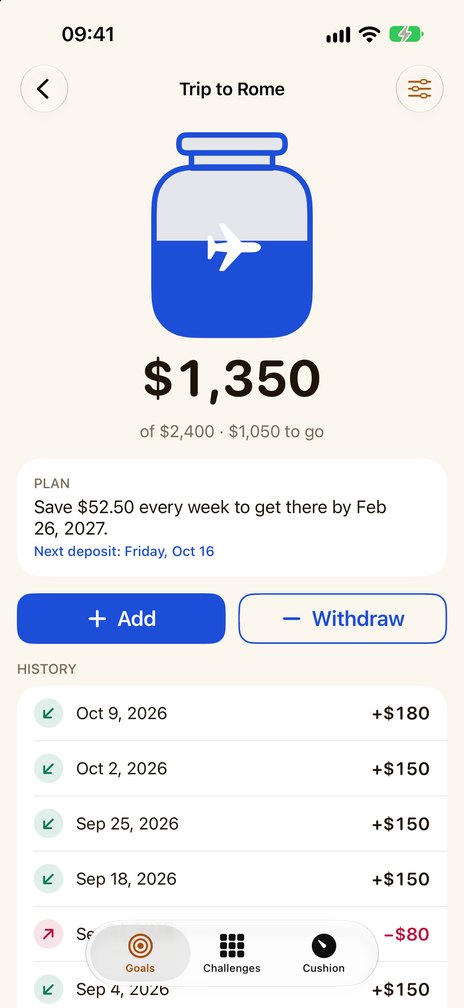
Pennyjar is an iPhone and iPad app that gives every savings goal its own jar on its Goals tab; the 52 week and 100 envelope challenges and an emergency fund counted in months are two tabs beside it. It records deposits and withdrawals with a date and a note, shows how far each goal has come, and works out the plan with the same arithmetic as this sheet: "Reach it by a date" gives the amount for each deposit, "Save a set amount" gives the day you get there. It can send a reminder on each deposit day, at the time you choose; reminders are set again each time you open it.
It is a record: it never holds or moves money and it calculates no interest. Two goals at a time are free; Pennyjar Pro, one payment for the whole app, removes the limit.
Coming soon to the App Store
More from Pennyjar
- Savings goal calculatorhow much to save each week or month to reach a date
- How long will it take to save?at the amount you can put in each time
- Down payment savings calculatorthe down payment on a home, then how much to save
- Printable savings trackerboxes to color in, or a thermometer
- Sinking fundswhat they are, a calculator and a printable
- The Pennyjar appa jar for every savings goal
More free savings tools
Last reviewed 8 October 2026